
Scan a shaft, raisebore, or ore pass with Hovermap
When scanning a shaft, raisebore, or ore pass, the best practice is to use Hovermap in its protective cage to shield the scanner. Shafts and passes are not ideal environments for flying. The surfaces can be very smooth with few features, which can lead to a SLAM slip and a crash.
Some features are still needed to scan a shaft. Completely featureless shafts do not scan well.
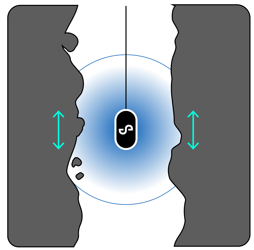
The recommended process is as follows.
What you will need
A Hovermap unit with its protective cage installed.
A lowering cable suitable for the depth of the shaft.
Emesent Commander installed and connected to Hovermap for live monitoring.
Aura installed for processing the scan data after capture.
Procedure
Step 1: Perform the mission
Lower Hovermap in its protective cage slowly towards the bottom of the shaft. A speed of around 1 metre per second is best. The cage slides along most steep surfaces.
If Hovermap becomes stuck on a small ledge, move the lowering cable around gently. The cage should roll out and continue its descent.
Avoid hitting the bottom of the shaft. If Hovermap hits the bottom, it makes direct contact with the soil and may become covered in mud, leaving it "blind" until cleaned. Hovermap delivers great resolution at large distances, so there is no need to get close. A distance of 10 m from the bottom is fine.
While scanning, check the live point cloud in Emesent Commander to ensure data is being collected correctly. When Hovermap reaches the top, stop the scan remotely.
Step 2: Process the scan data
Process the scan data in Aura. Select the Standard profile for the first job. The starting point may not be aligned with the endpoint of the scan, most likely due to the lack of features (especially horizontal features) that would help Hovermap determine its position on the Z-axis.
If the results are not as desired, change the processing parameters. For a linear scan such as a shaft, the recommended parameter changes are:
Section | Parameter | Value |
|---|---|---|
Local Mapping | Voxel size | 0.2 |
Global Registration | Voxel size | 0.2 |
Matching: Max Distance | 5.00 |
These processing parameters work more often than not, but results still depend on the specific environment. If the result is not as expected, adjust the remaining settings. Be aware that tuning beyond the recommended parameters significantly increases processing times.
Outcome
The shaft, raisebore, or ore pass has been scanned and the scan data has been processed in Aura.
Related documentation and support
For assistance, contact the regional Emesent partner or the Emesent Client Support team.