
A failsafe is an action that Hovermap performs in response to a failure. Failsafes operate only during Autonomy-assisted missions.
Only one failsafe can be active at a time. Failsafes are ordered in a prioritized list, as shown by the priority number in each section below. If more than one failsafe triggers, the failsafe with the lowest priority number takes precedence.
When a failsafe triggers, it appears as a notification in the Active Failsafe area beside the Notification button. Select that notification to see more detail about the failsafe. All other notifications appear below the failsafe, in order of severity.
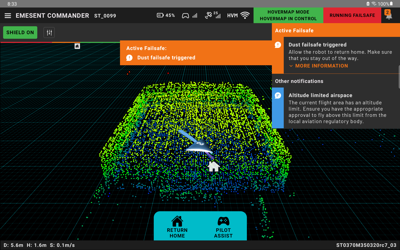
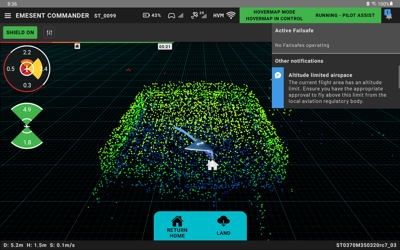
When a failsafe is active, no other notification appears in the Main View. To see the other notifications, select the Notification button.
When the failsafe completes, it is removed from the Active Failsafe area. Notifications then appear as usual.
Robot link loss
Priority: 1
Field | Detail |
|---|---|
Notification text | Lost robot link |
Description | The link between the robot and Hovermap is lost. |
Hovermap response | Hovermap tries to establish the connection again and take control of the robot. |
Operator action | Take manual control of the robot and land immediately. Do not take off if the robot is on the ground. |
Prerequisite | N/A |
Abort-able | This failsafe aborts automatically when the connection to the robot is available again. |
Control authority denied
Priority: 2
Field | Detail |
|---|---|
Notification text | Hovermap control refused |
Description | The robot does not let Hovermap take control. |
Hovermap response | Hovermap continues to request control of the robot. |
Operator action | Land the robot immediately. Do not take off if the robot is on the ground. |
Prerequisite | N/A |
Abort-able | This failsafe aborts automatically when the robot lets Hovermap take control. |
Control authority loss
Priority: 3
Field | Detail |
|---|---|
Notification text | Lost Hovermap control |
Description | Hovermap loses control and authority over the robot. |
Hovermap response | Hovermap tries to get control of the robot again. |
Operator action | Take manual control of the robot and land immediately. Do not take off if the robot is on the ground. |
Prerequisite | N/A |
Abort-able | This failsafe aborts automatically when Hovermap gets control of the robot again. |
Robot control not take-able
Priority: 4
Field | Detail |
|---|---|
Notification text | Hovermap cannot take control |
Description | Hovermap cannot take control of the robot. |
Hovermap response | Hovermap monitors the state of the robot to find when it can take control. |
Operator action | Land the robot immediately. Do not take off if the robot is on the ground. |
Prerequisite | N/A |
Abort-able | This failsafe aborts automatically when Hovermap finds that it is safe to do so. |
Hardware integrity
Priority: 5
Field | Detail |
|---|---|
Notification text | Robot hardware failure |
Description | Hovermap detects that the robot has physical damage. |
Hovermap response | Hovermap tries to put the robot into a safe state. |
Operator action | If it is safe to do so, take manual control of the robot, land, and disarm the motors immediately. |
Prerequisite | N/A |
Abort-able | Not abort-able |
Launch error
Priority: 6
Field | Detail |
|---|---|
Notification text | Take off aborted |
Description | Hovermap aborts a take-off. |
Hovermap response | Monitor the drone as it disarms or lands. Make sure that the shield settings are correct. Make sure that there are no objects near the robot, then try to launch again. |
Operator action | N/A |
Prerequisite | N/A |
Abort-able | Not abort-able |
State estimation critical
Priority: 7
Field | Detail |
|---|---|
Description | Hovermap loses all of its navigation sources (SLAM and GPS). |
Hovermap response | Hovermap lands the robot. |
Operator action | Take manual control of the robot and land immediately. Do not take off if the robot is on the ground. |
Prerequisite | N/A |
Abort-able | Not abort-able |
Battery critical
Priority: 8
Field | Detail |
|---|---|
Notification text | Hovermap battery critical |
Description | Hovermap detects that the battery of the robot is at a critical level. |
Hovermap response | Hovermap lands the robot. |
Operator action | Monitor |
Prerequisite | N/A |
Abort-able | Not abort-able |
Path planner stuck (heavy dust)
Priority: 9
Field | Detail |
|---|---|
Description | Hovermap detects that it cannot plan a path through the environment. Heavy dust is one cause of this condition. |
Hovermap response | The robot retraces its path back through the environment for 30 meters, or until it reaches home. During this time, Hovermap cannot register new obstacles that move into its path. After 30 meters, Hovermap starts a Return to Home sequence. |
Operator action | Monitor |
Prerequisite | N/A |
Abort-able | Abort the failsafe at any time in the Commander app. Alternatively, toggle the flight mode switch out of and back into Hovermap mode twice (double toggle). |
Lidar data integrity
Priority: 10
Field | Detail |
|---|---|
Description | Hovermap detects that its lidar points cannot reach the objects around it because of atmospheric conditions. |
Hovermap response | Hovermap starts a Return to Home immediately, to move away from the atmospheric conditions. |
Operator action | Monitor |
Prerequisite | N/A |
Abort-able | Abort the failsafe at any time in the Commander app. Alternatively, toggle the flight mode switch out of and back into Hovermap mode twice (double toggle). |
After the Lidar data integrity failsafe triggers, a notification advises an immediate return home. This notification stays for the remainder of the mission, even after an operator aborts the failsafe.
State estimation degraded
Priority: 11
Field | Detail |
|---|---|
Notification text | Navigation solution degraded |
Description | Hovermap loses its primary source of navigation. |
Hovermap response | Hovermap waits up to 10 seconds to get a navigation source again. If it gets a navigation source, Hovermap starts a Return to Home. If it does not get a navigation source after 10 seconds, the State estimation critical failsafe triggers. |
Operator action | Monitor. Take control in Pilot Assist mode and land as soon as possible. |
Prerequisite | N/A |
Abort-able | Abort the failsafe at any time in the Commander app. Alternatively, toggle the flight mode switch out of and back into Hovermap mode twice (double toggle). |
After an operator aborts the State estimation degraded failsafe, it does not trigger again until the robot lands and disarms.
Battery low
Priority: 12
Field | Detail |
|---|---|
Notification text | Hovermap battery low |
Description | Hovermap detects that the battery of the robot is at a low level. |
Hovermap response | Hovermap starts a Return to Home sequence. |
Operator action | Monitor |
Prerequisite | N/A |
Abort-able | Abort the failsafe at any time in the Commander app. Alternatively, toggle the flight mode switch out of and back into Hovermap mode twice (double toggle). |
After an operator aborts the Battery low failsafe, it does not trigger again until the robot lands and disarms.
GCS link loss
Priority: 13
Field | Detail |
|---|---|
Notification text | Connection between hovermap and user device was lost |
Description | Hovermap loses its connection to the Commander app and reaches its final waypoint with no further instruction. |
Hovermap response | Hovermap starts a Return to Home sequence. |
Operator action | Monitor |
Prerequisite | This failsafe triggers only if the robot reaches the last operator-defined waypoint and the GCS link is lost. |
Abort-able | This failsafe aborts automatically when Hovermap connects to the GCS again and reaches the home point or the rally point. Alternatively, abort the failsafe in the Commander app after the GCS link is available again. Another option is to toggle the flight mode switch out of and back into Hovermap mode. |
RC link loss
Priority: 14
Field | Detail |
|---|---|
Notification text | Remote control has been disconnected. |
Description | Hovermap detects that the robot no longer has a link to its remote control unit, and that the robot operates in Teleoperate mode. |
Hovermap response | Hovermap starts a Return to Home sequence. |
Operator action | Monitor |
Prerequisite | This failsafe triggers only if the robot operates in Pilot Assist mode and the RC link is lost. |
Abort-able | This failsafe aborts automatically when Hovermap gets an RC connection again and reaches the home point or the rally point. Alternatively, abort the failsafe in the Commander app, or toggle the flight mode switch out of and back into Hovermap mode. |
Data recording stopped
Priority: 15
Field | Detail |
|---|---|
Notification text | Hovermap storage full, data recording stopped |
Description | The remaining data storage is below 2 GB. |
Operator action | Land |
Prerequisite | N/A |
Abort-able | Not abort-able |
Data storage critical
Priority: 16
Field | Detail |
|---|---|
Notification text | Hovermap storage critically low |
Description | The remaining data storage is below 5 GB. |
Hovermap response | Hovermap starts a Return to Home sequence. |
Operator action | Monitor |
Prerequisite | N/A |
Abort-able | Abort the failsafe at any time in the Commander app. |
Not ready to arm
Priority: 17
Field | Detail |
|---|---|
Notification text | Robot’s position not stable. |
Description | Hovermap detects that it is not in a state that lets the robot arm. |
Hovermap response | Hovermap sends a notification to the operator. |
Operator action | Do not attempt to take off. |
Prerequisite | N/A |
Abort-able | Not abort-able |
CPU temperature high
Priority: 18
Field | Detail |
|---|---|
Notification text | High Hovermap temperature |
Description | Hovermap detects that its CPU temperature is near a high limit. |
Hovermap response | Hovermap sends a notification to the operator. |
Operator action | Be careful when handling the Hovermap payload. The heatsink on the payload can be hot. |
Prerequisite | N/A |
Abort-able | Not abort-able |
Data storage low
Priority: 19
Field | Detail |
|---|---|
Notification text | Hovermap storage low |
Description | The remaining data storage is below 20 GB. |
Hovermap response | Hovermap sends a notification to the operator. |
Operator action | Monitor. Consider a return to home before the data storage is full. |
Prerequisite | N/A |
Abort-able | Not abort-able |
Still not resolved?
If a failsafe triggers and the cause is not clear, contact Client Support with the following information:
Product and version.
The on-screen text of the failsafe, and the point in the mission at which it appeared.
Steps you have already tried.
Any error messages or logs.