
Hovermap mounts to a drone or a vehicle, and it also supports walking and backpack scans. The quick-release mechanism makes it easy to change between these options.
Hovermap is lightweight, yet robust enough to withstand the demands of harsh environments. Hovermap is made from machined aircraft-grade aluminum and reinforced polypropylene. It is light, but strong enough to support its rotating LiDAR and stay stable in flight.
Benefits of Hovermap
Safety: Removes the need for people to go into hazardous areas.
Access: Captures data in areas that other technologies cannot reach.
Efficiency: Surveys areas quickly, including setup and pack-up.
Ease of use: Autonomy and collision avoidance make operation simpler.
Versatility: Hovermap mounts in many configurations to suit the task. Hovermap is used for a wide variety of commercial applications, including mining, construction and engineering, geospatial, and public safety.
Survey-grade datasets: Hovermap makes dense point clouds with survey-grade accuracy. For georeferencing, use a supported RTK receiver on the Backpack RTK or Vehicle RTK, or use ground control points.
True color scans: The optional colorization feature adds true color to 3D point clouds.
Inclusions
Standard Hovermap kit
The standard Hovermap kit includes these items. The numbers in the table match the numbers in the image.
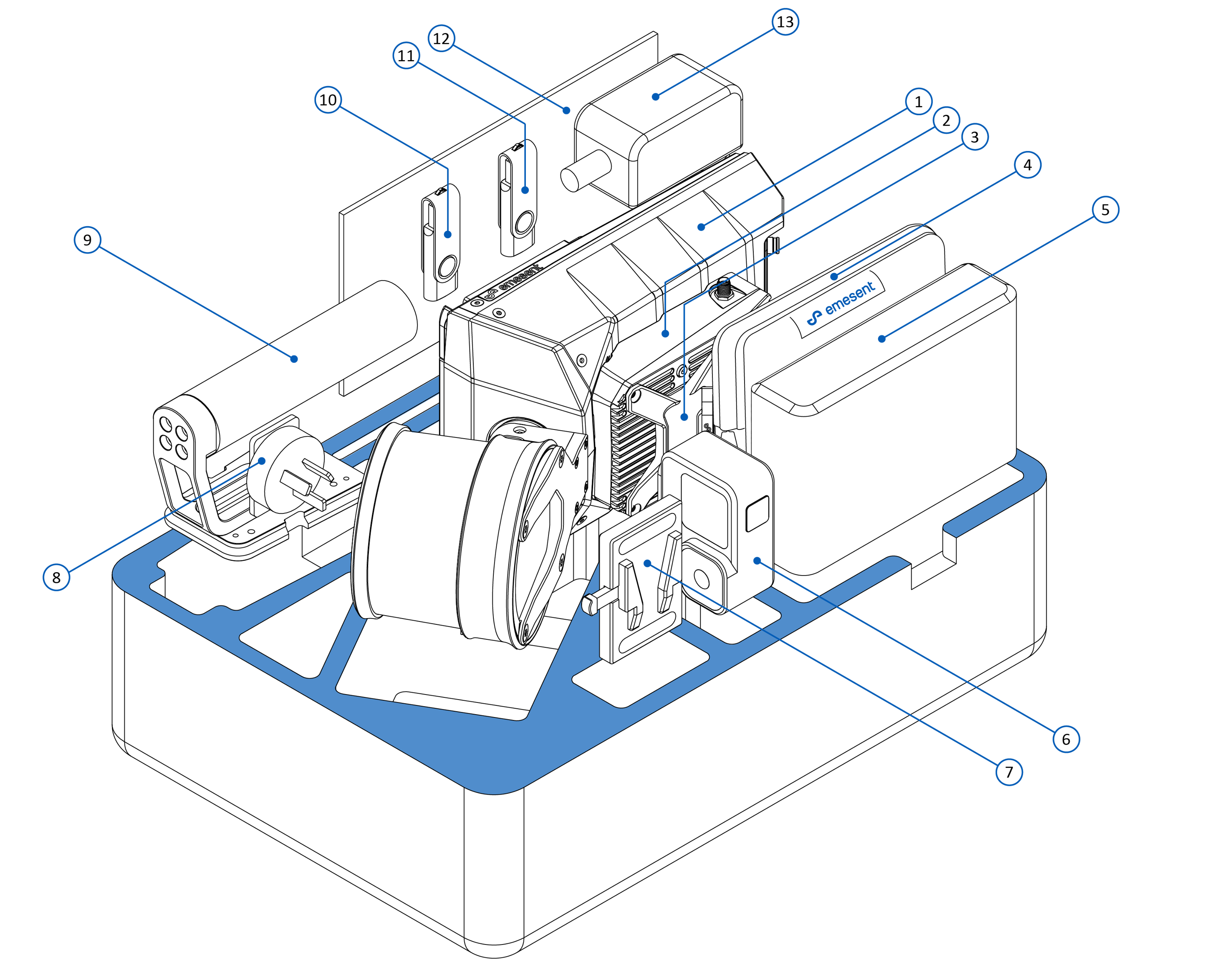
No. | Item | More information |
|---|---|---|
1 | Hovermap | |
2 | Colorization mount (optional) | |
3 | Long Range Radio (optional) | |
4 | Cable bag, with 1 battery cable for walking scans (1.5 m) | |
5 | Battery | |
6 | GoPro (optional) | |
7 | Battery belt clip | |
8 | International adapters (US/Canada, Australia/New Zealand, Europe/Japan) | |
9 | Handle | |
10 | Hovermap manual (on USB flash drive) | |
11 | Emesent Aura license dongle | |
12 | Quick-start guide | |
13 | Battery charger |
Common tasks
Task | Article |
|---|---|
Prepare Hovermap for a mission | |
Plan a mission | |
Check the operating limits | |
Charge the battery | |
Choose a platform | |
Find an accessory | |
Read the LEDs and connections on the unit | |
Check the technical specifications | |
Clean the LiDAR lens | |
Store, transport, or ship Hovermap | |
Request service |