
For the DJI M300 / M350 setup overview, see DJI M300 and M350 setup guide.
This FAQ covers the RTK processing capabilities of Aura, designed for integration of RTK data from base stations with the DJI M300/M350 drone. It answers commonly asked questions about RTK technology, its application, and the point cloud processing workflow.
Overview
What does RTK mean?
Real-Time Kinematic.
How does RTK work?
Real-Time Kinematic (RTK) systems use advanced techniques to provide highly accurate positioning solutions. They leverage the phase measurements of the signal's carrier wave in conjunction with the signal's information content. These systems rely on a single reference station or interpolated virtual station to provide real-time corrections, which can achieve up to centimetre-level accuracy. In this setup, a single base station receiver is used in combination with multiple mobile units. The base station broadcasts the phase of the carrier that it observes, and the mobile units compare their phase measurements with the ones received from the base station, enabling precise positioning.
What is CORS?
A Continuously Operating Reference Station (CORS) network is a group of RTK base stations that transmit corrections, typically over an internet connection. The positioning accuracy is improved in a CORS network because multiple stations work together to ensure correct positioning and prevent false initialisation of a single base station.
When is it better to use RTK instead of Ground Control Targets?
RTK can potentially provide more accurate georeferenced scans faster when a GPS signal is available (for example, not indoors or underground), since there is no need to set out or survey targets.
Does RTK work in areas without GPS coverage?
No. RTK relies on signals from the Global Navigation Satellite System (GNSS) and only works above ground. It is not suitable for underground mines or confined spaces.
Accuracy and benefits
What are the benefits of capturing Hovermap data with M300 RTK?
To enhance the accuracy of the SLAM (Simultaneous Localisation and Mapping) output, georeferencing the data is essential. Georeferencing eliminates the need to close the loop when capturing data, eliminates drift, and improves the overall mapping accuracy.
RTK also enables the capturing of large-scale environments such as beaches, fields, and vegetation, where SLAM alone tends to perform poorly.
For users of the Hovermap ST-X, georeferencing also enables data capture at higher speeds and with greater efficiency.
What is the expected level of accuracy when using RTK?
50% percentile / median:
Horizontal accuracy is less than 20 mm.
Vertical accuracy is less than 40 mm.
90% confidence:
Horizontal accuracy is less than 40 mm.
Vertical accuracy is less than 50 mm.
Hardware and software requirements
What hardware and software do I need to capture RTK data?
Hardware
DJI M300 / M350.
GNSS mobile receiver:
Emlid Reach RS2+ Base Station (recommended).
DJI D-RTK2 (supported).
Software
Aura:
M300: version 1.3 or higher with a valid RTK license.
M350: version 1.4.1 or higher with a valid RTK license.
Emesent Commander:
M350 only: version 1.1 or higher.
Emesent Cortex:
M300: version 2.7 or higher.
M350: version 3.1 or higher.
For AL0 clients:
The onboard DJI SDK must be set up on the M300/M350 to allow GPS data to be recorded by Hovermap.
Can I use the RTK feature with an M300 in Mapping mode (AL0)?
Yes. However, the M300 must have the onboard SDK set up to allow GPS data to be recorded by Hovermap. Refer to the following resources for detailed instructions:
Knowledge Base video: SDK activation with the DJI M300 and Hovermap.
Can I use the RTK feature without a drone (Mapping mode only)?
No. Ground-based RTK, currently in development, will be added in a future release.
Is RTK compatible with the M210v1 or Zoe?
No. There are no plans to provide support for these platforms.
Workflow and processing
What is the workflow for georeferencing a point cloud using RTK data?
The workflow is similar to standard SLAM processing. If the bag file contains RTK data, Aura automatically detects it and prompts the operator to use the data for correcting and georeferencing the point cloud.
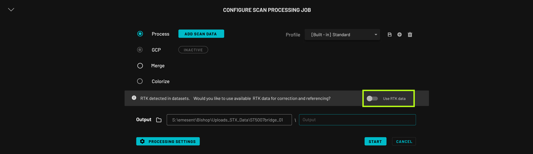
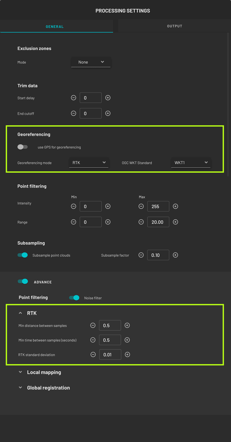
Toggle Use RTK data to bring up the Processing Settings panel. Fine-tune the RTK and output parameters, or override RTK by changing the Georeferencing Mode. When done, click Save. To exit without saving the changes, click Close.
How does Hovermap use RTK data?
RTK data samples are re-projected onto a tangent plane around a point in the scan area using a Transverse Mercator projection to minimise distortion caused by the earth's curvature. This projection is described in the .PRJ file provided alongside the point cloud, rather than an EPSG code.
Clients are currently required to re-project the data to their preferred CRS using third-party software (for example, QGIS or Global Mapper), but future Aura releases may handle this.
RTK-derived constraints for the SLAM solution are generated using RTK data samples with minimum distance and time intervals. The minimum time intervals can be adjusted using advanced processing parameters.
Any RTK data samples from low-quality RTK fixes are rejected.
During SLAM processing, the RTK-derived constraints are considered using a fixed Standard Deviation that describes the uncertainty in the constraint position. Advanced processing parameters can be used to adjust the Standard Deviation. The LiDAR also provides constraints, so both LiDAR and RTK constraints are considered during SLAM processing.
What output is provided as part of the RTK workflow?
The data files generated by SLAM include all the standard output files. Additionally, there is a projection file with a .PRJ extension that defines the coordinate system and projection information of the output data.
The RTK-georeferenced data to use for downstream work is in the write_global_landmark_referenced output folder.
What is Advanced feature matching, and why is it disabled by default for RTK data processing?
The Advanced feature matching stage in SLAM processing provides a better output for most environments. However, for RTK data, disabling this stage reduces error distribution and provides a better output.
Can I further correct RTK data with GCPs?
It is currently not possible to use both RTK and GCPs at the same time due to the complexity in determining which one is better for specific locations and situations. Assigning confidence or priority to different sections of RTK and GCP data can be challenging. This is being considered as a future enhancement to Aura though there is no timeframe currently available.
Base station setup options
Is it necessary to use a base station for receiving RTK correction?
For the most accurate results, the use of a local base station positioned over a surveyed point is recommended. If a surveyed point is not available, other setups can be used depending on the hardware and local infrastructure available. The four options below cover the recommended configurations.
Option 1: Emlid Reach RS2+ local base station
Two base positioning methods are recommended:
Located over a surveyed point, or
RTK Fix Position using NTRIP data from the CORS network. 4G or Wi-Fi access is required for this positioning method. For more information on Emlid base station setup options, see Placing the base | RTK Modules.
Pros
Up to centimetre-level local accuracy (between the base station and the M300).
Access to a 4G or Wi-Fi network is not required when set up over a surveyed point.
High absolute accuracy can be achieved for the local base position using averaged readings from the CORS network (accuracy approximately 7 mm + 1 mm/km distance to connected reference station).
Can be mounted to survey-grade tripods.
Can be used as a surveying device when connected to the CORS network (for example, to survey the position of GCPs).
Cons
When used as a local base station, the M300 controller must remain within the local Wi-Fi range (approximately 20 m) of the RS2+ position to receive RTK correction data.
Base station hardware purchase and setup are required.
Emesent Commander cannot be directly run on the M350 RC Plus controller since its Wi-Fi is connected to the RS2+. Emesent Commander must be run on an external tablet rather than directly on the controller.
Option 2: DJI D-RTK2 local base station
Base positioning method:
Located over a surveyed point.
Pros
Up to centimetre-level local accuracy (between the base station and the M300).
Access to a 4G or Wi-Fi network is not required.
Distance between the D-RTK2 base position and M300 controller can be extended within the DJI OcuSync range, as long as visual line-of-sight is maintained.
Cons
Requires a surveyed point for accurate absolute position results.
Cannot be used as a surveying device, for either GCPs or for determining an accurate absolute position of the base station when a surveyed point is not available.
Base station hardware purchase and setup are required.
Option 3: 4G dongle for DJI M300 Smart Controller
The DJI M300 can use a 4G SIM card dongle to allow direct connection to the CORS network (in regions where this service is available): DJI Matrice 300 PT17 — 4G Dongle ZTE MF833V SIM Card Dongle for RTK.
Pros
Minimal additional hardware purchase and setup required.
The M300 Smart Controller is not tied to a limited distance from the local base position.
Cons
Requires 4G connectivity.
Relies on the availability of an external CORS network.
Absolute accuracy depends on operator distance from the nearest reference station — positional uncertainty is accrued at approximately 1 mm/km.
Option 4: DJI M350 RC Plus controller direct to CORS network
The M350 RC Plus controller can be configured to directly access the CORS network (in regions where this service is available) if a Wi-Fi network is available at the location where the mission is being conducted.
Pros
No additional hardware purchase and setup required.
The M350 RC Plus controller is not tied to a limited distance from a local base position.
Cons
Requires Wi-Fi network connectivity.
Relies on the availability of an external CORS network.
Absolute accuracy depends on operator distance from the nearest reference station — positional uncertainty is accrued at approximately 1 mm/km.
Emesent Commander cannot be directly run on the M350 RC Plus controller since its Wi-Fi is connected to an external network to access CORS. Emesent Commander must be run on an external tablet rather than directly on the controller.
Best practices and limitations
What is the best practice for capturing RTK data to get the best possible results?
Speed and altitude
To obtain a high-quality point cloud output, fly at the recommended speed and altitude. Flying at higher speeds and altitudes can still result in a good output, but the recommended values are:
For Hovermap ST-X:
Speed: 6 m/s.
Altitude: 30 m.
For Hovermap ST and HVM100:
Speed: 3 m/s.
Altitude: 20 m.
Flight path
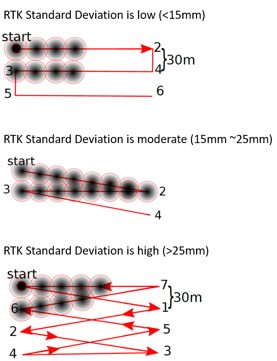
For best results with Hovermap and the M300 RTK, use a lawnmower pattern with traverses at a maximum of 30 m intervals. In areas with poor RTK signal, introducing more zigzags and overlaps can help improve the accuracy of the point cloud. See the diagram below.
What impact does an RTK dropout have on point cloud processing?
The parts of the trajectory that lack reliable RTK data are excluded from RTK-based processing. Mapping on those sections will be based solely on SLAM. However, the availability of RTK data on other parts of the trajectory results in a better outcome than pure SLAM.
What are the recommended practices when the scan exceeds the M300 battery life?
Some clients have reported positive outcomes by switching out batteries on the M300 while simultaneously carrying out a Hovermap scan. However, this practice has not been validated and cannot be guaranteed to work in all cases. If this method does not work, third-party software is required to merge multiple RTK Hovermap datasets.
Compatibility and data handling
How do I specify the datum in use by my RTK system?
Currently, there is no way for clients to specify the datum in use by their RTK system. Aura assumes that WGS84 is being used.
If a different datum has been used, edit the .PRJ file and change the string that specifies the datum.
How do I apply a GEOID to my data?
Aura uses ellipsoid height. Apply a GEOID using third-party software.
What software can I use to help with reprojecting my data?
Reprojection is supported in Aura version 1.6 or later. Refer to the Aura documentation for instructions on reprojecting data.
How is scaling handled in the processed RTK data?
The output point cloud is in a Transverse Mercator projection rather than a Universal Transverse Mercator (UTM) projection. The Transverse Mercator projection has unity (1.0) scaling and uses a local origin calculated from the RTK values. As a result, the point cloud coordinates have smaller values than UTM and no scaling is applied to the point cloud. See What software can I use to help with reprojecting my data? for how to move the point cloud to another projection.
Does RTK work with colorization?
Yes.
Can multiple RTK datasets be merged?
No. This is being considered as a future enhancement to Aura though there is no timeframe currently available.
Related documentation and support
For assistance, contact the regional Emesent partner or the Emesent Client Support team.